The new SharePoint SDK 1.5 has been release on April 2009. This version includes a new version of the Microsoft Business Data Catalog Definition Editor tool.
Downloads:
- SharePoint Server 2007 SDK: here
- Windows SharePoint Services 3.0 SDK: here
MSDN Documentation::
- SharePoint Server 2007 SDK: here
- Windows SharePoint Services 3.0 SDK: here
May 29, 2009


Mark Wagner explains "How To Hide/Remove the View All Site Content link in SharePoint"
Here is the link to read his article: http://www.crsw.com/mark/Lists/Posts/Post.aspx?ID=36
Here is the link to download the solution package: http://www.crsw.com/mark/Files/VASCSiteAction/VASCSiteAction-Binary.zip
Here is the link to download the solution package: http://www.crsw.com/mark/Files/VASCSiteAction/VASCSiteAction-Binary.zip
May 28, 2009
Visual Studio 2010 and .NET Framework 4 Beta 1 available for download
Visual Studio 2010 and .NET Framework 4 Beta 1 are available for download. You will find more information and the download links here.
Attention: Important Information on Service Pack 2
The Microsoft SharePoint Team has just published an important information on Service Pack 2. They have recently discovered a bug with Service Pack 2 (SP2) that affects all customers that have deployed it for SharePoint Server 2007.
Read more: here
Read more: here
Content Types Inheritance: How to remove a field inherited from the parent in CAML
As you know, you can inherit from a Content Type in CAML simply in specifying a valid ID. Typically, to inherit from an existing Content Type, you have to respect the following rule: Parent content type ID + "00" + hexadecimal GUID
e.g.: 0x01 (ID of the Item Content Type) + 00 + 21D64BFAA43542c0B10CB673D6445495
The problem when inheriting is that you don't specially need all fields from the parent. To remove a field inherited from the parent, you have to use the RemoveFieldRef tag in specifying the ID of the field.
In the following example, I inherit from the Item Content Type but I add two new fields (Year and Amount) and I remove the Title field:
Have a look on the following MSDN links to understand how Content Types work:
Base Content Type Hierarchy: http://msdn.microsoft.com/en-us/library/ms452896.aspx
Content Type IDs: http://msdn.microsoft.com/en-us/library/aa543822.aspx
Creating Content Types Based on Other Content Types: http://msdn.microsoft.com/en-us/library/ms460224.aspx<
e.g.: 0x01 (ID of the Item Content Type) + 00 + 21D64BFAA43542c0B10CB673D6445495
The problem when inheriting is that you don't specially need all fields from the parent. To remove a field inherited from the parent, you have to use the RemoveFieldRef tag in specifying the ID of the field.
In the following example, I inherit from the Item Content Type but I add two new fields (Year and Amount) and I remove the Title field:
<?xml version="1.0" encoding="utf-8" ?>
<Elements xmlns="http://schemas.microsoft.com/sharepoint/">
<ContentType ID="0x010021D64BFAA43542c0B10CB673D6445495"
Name="Budget"
Description="Create a new budget"
Version="0"
Group="My Inherited Content Types" >
<FieldRefs>
<RemoveFieldRef ID="{fa564e0f-0c70-4ab9-b863-0177e6ddd247}"/>
<FieldRef DisplayName="Year" ID="{6FC684B4-CE06-480f-A8A5-E62277AAFB79}" Name="Year_MICT" />
<FieldRef DisplayName="Amount" ID="{A4D2A891-27D6-4f5d-B5C2-4A9AC4D2000D}" Name="Amount_MICT" />
</FieldRefs>
</ContentType>
</Elements>
Have a look on the following MSDN links to understand how Content Types work:
Base Content Type Hierarchy: http://msdn.microsoft.com/en-us/library/ms452896.aspx
Content Type IDs: http://msdn.microsoft.com/en-us/library/aa543822.aspx
Creating Content Types Based on Other Content Types: http://msdn.microsoft.com/en-us/library/ms460224.aspx<
May 06, 2009
White paper: Working with large lists in Office SharePoint Server 2007
There is an interisting white paper showing how to optimize list performance through limits on the number of items that appear in a list, and by choosing the most appropriate method of retrieving list contents.
Source: here
Download: http://go.microsoft.com/fwlink/?LinkId=95450&clcid=0x409
Source: here
Download: http://go.microsoft.com/fwlink/?LinkId=95450&clcid=0x409
April 29, 2009
Service Pack 2 for Office SharePoint Server 2007 and Windows SharePoint Services 3.0 are available
The Microsoft SharePoint Team has just announced the availability of the Service Pack 2 for Office SharePoint Server 2007 and Windows SharePoint Services 3.0
Source: here
Service Pack 2 for Windows SharePoint Services 3.0, x86 & x64: http://www.microsoft.com/downloads/details.aspx?FamilyId=79BADA82-C13F-44C1-BDC1-D0447337051B&displaylang=en
Service Pack 2 for Office SharePoint Server 2007, x86 & x64: http://www.microsoft.com/downloads/details.aspx?FamilyId=B7816D90-5FC6-4347-89B0-A80DEB27A082&displaylang=en
Source: here
Service Pack 2 for Windows SharePoint Services 3.0, x86 & x64: http://www.microsoft.com/downloads/details.aspx?FamilyId=79BADA82-C13F-44C1-BDC1-D0447337051B&displaylang=en
Service Pack 2 for Office SharePoint Server 2007, x86 & x64: http://www.microsoft.com/downloads/details.aspx?FamilyId=B7816D90-5FC6-4347-89B0-A80DEB27A082&displaylang=en
April 16, 2009
Microsoft SharePoint “14” is now Microsoft SharePoint 2010
You have probably seen the news announcement today where we announced the public beta for the new Microsoft Exchange Server 2010. As part of that announcement, we also talked about some of the names for the “14” wave of products including Microsoft Office 2010 and Microsoft SharePoint Server 2010. I wanted to answer some questions that I think will inevitably pop to the top of your mind:
What happened to the Office piece of the name? We love MOSS. . . .
The first thing you’ll notice is that the MOSS acronym goes away with the new name since Office is no longer in the SharePoint official name. No one should worry that SharePoint doesn’t work great with Office 2010 since we removed Office from the name, just like people didn’t worry whether SharePoint was a great portal product when we removed Portal from the 2007 name.
The primary reason why we took Office out of the name - lots of folks associate the name Office with the Office client. We wanted to take the opportunity to reestablish the Office name and brand to be synonymous with the client suite. I say “Give the people what they Want” so everyone should immediately think of Microsoft Office = Office apps.
Don’t try to acronym Microsoft SharePoint Server to MSS since MSS is already taken by Microsoft Search Server. Just remember, SharePoint is SharePoint is SharePoint.
What about Windows SharePoint Services?
When you read through the announcement, you may be wondering what happened to Windows SharePoint Services. While we didn’t announcement anything new for WSS, and I want to assure you that we’re definitely working on a new v4 version of the product. It’s too early to drill into any of the details but WSS is getting a lot of new features and will be a great release. We’ll talk more about WSS at a later date.
So, what was announced?
Here are my key takeaways from the interview with Chris Capossela:
• Exchange 2010 will lead the way for the 2010 (previously referred by its codename “14”) wave of technologies and it will be available in the second half of 2009.
• Using Office Web applications, customers will be able to create, edit and collaborate on Office documents through a browser.
• IT professionals will be able to choose to either deploy and manage on-premises or hosted as a service.
• For developers, we are working on Open APIs, deep support for industry standards and developer tool support with Visual Studio 2010.
Thomas Rizzo
Sr. Director
SharePoint
Source: http://blogs.msdn.com/sharepoint/archive/2009/04/14/microsoft-sharepoint-14-is-now-microsoft-sharepoint-2010.aspx
What happened to the Office piece of the name? We love MOSS. . . .
The first thing you’ll notice is that the MOSS acronym goes away with the new name since Office is no longer in the SharePoint official name. No one should worry that SharePoint doesn’t work great with Office 2010 since we removed Office from the name, just like people didn’t worry whether SharePoint was a great portal product when we removed Portal from the 2007 name.
The primary reason why we took Office out of the name - lots of folks associate the name Office with the Office client. We wanted to take the opportunity to reestablish the Office name and brand to be synonymous with the client suite. I say “Give the people what they Want” so everyone should immediately think of Microsoft Office = Office apps.
Don’t try to acronym Microsoft SharePoint Server to MSS since MSS is already taken by Microsoft Search Server. Just remember, SharePoint is SharePoint is SharePoint.
What about Windows SharePoint Services?
When you read through the announcement, you may be wondering what happened to Windows SharePoint Services. While we didn’t announcement anything new for WSS, and I want to assure you that we’re definitely working on a new v4 version of the product. It’s too early to drill into any of the details but WSS is getting a lot of new features and will be a great release. We’ll talk more about WSS at a later date.
So, what was announced?
Here are my key takeaways from the interview with Chris Capossela:
• Exchange 2010 will lead the way for the 2010 (previously referred by its codename “14”) wave of technologies and it will be available in the second half of 2009.
• Using Office Web applications, customers will be able to create, edit and collaborate on Office documents through a browser.
• IT professionals will be able to choose to either deploy and manage on-premises or hosted as a service.
• For developers, we are working on Open APIs, deep support for industry standards and developer tool support with Visual Studio 2010.
Thomas Rizzo
Sr. Director
SharePoint
Source: http://blogs.msdn.com/sharepoint/archive/2009/04/14/microsoft-sharepoint-14-is-now-microsoft-sharepoint-2010.aspx
April 15, 2009
How to create or copy permission levels programmatically
The class representing the permission level in SharePoint is the SPRoleDefinition one: http://msdn.microsoft.com/en-us/library/microsoft.sharepoint.sproledefinition.aspx
To modifies the permissions, you have to use the BasePermissions property (SPBasePermissions enumeration): http://msdn.microsoft.com/en-us/library/microsoft.sharepoint.sproledefinition.basepermissions.aspx
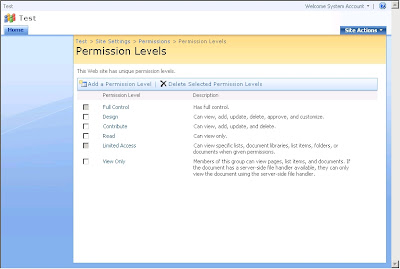
Hereunder is the Permission Levels page of a SharePoint site before:
The following piece of code shows how to create a new permission level:
The following piece of code shows how to copy a permission level (in this case the permission level of the Reader role) and to add two new permissions to it:
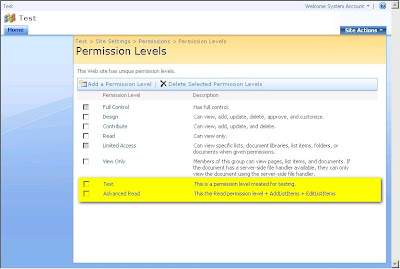
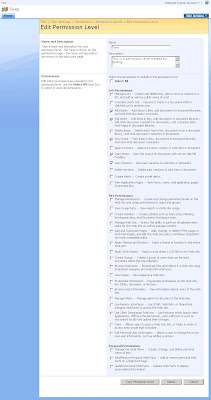
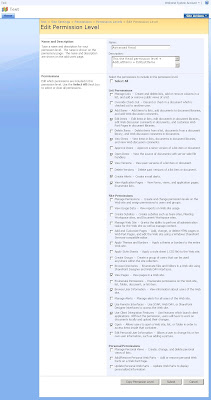
Hereunder are the Permission Levels page and the Edit Permission Level pages after:
To modifies the permissions, you have to use the BasePermissions property (SPBasePermissions enumeration): http://msdn.microsoft.com/en-us/library/microsoft.sharepoint.sproledefinition.basepermissions.aspx
Hereunder is the Permission Levels page of a SharePoint site before:

The following piece of code shows how to create a new permission level:
using (SPSite siteCollection = new SPSite("http://myserver:38000/sites/Test"))
{ using (SPWeb site = siteCollection.OpenWeb(siteCollection.RootWeb.ID)) { try { site.AllowUnsafeUpdates = true; // This code adds a new permission level SPRoleDefinition newRoleDefinitionTest = new SPRoleDefinition();newRoleDefinitionTest.BasePermissions = SPBasePermissions.ViewListItems | SPBasePermissions.OpenItems | SPBasePermissions.EditListItems | SPBasePermissions.AddListItems | SPBasePermissions.ViewVersions;
newRoleDefinitionTest.Name = "Test"; newRoleDefinitionTest.Description = "This is a permission level created for testing.";site.RoleDefinitions.Add(newRoleDefinitionTest);
site.Update();
}
catch(Exception ex)
{ Console.WriteLine(ex.Message);}
finally { site.AllowUnsafeUpdates = false;}
}
}
The following piece of code shows how to copy a permission level (in this case the permission level of the Reader role) and to add two new permissions to it:
using (SPSite siteCollection = new SPSite("http://myserver:38000/sites/Test"))
{ using (SPWeb site = siteCollection.OpenWeb(siteCollection.RootWeb.ID)) { try { site.AllowUnsafeUpdates = true; // This code copies the Read permission level (Reader role) and adds AddListItems and EditListItems permissionsSPRoleDefinition roleDefinitionRead = site.RoleDefinitions.GetByType(SPRoleType.Reader);
SPRoleDefinition newRoleDefinitionAdvancedRead = new SPRoleDefinition(roleDefinitionRead);newRoleDefinitionAdvancedRead.BasePermissions |= SPBasePermissions.AddListItems | SPBasePermissions.EditListItems;
newRoleDefinitionAdvancedRead.Name = "Advanced Read"; newRoleDefinitionAdvancedRead.Description = "This the Read permission level + AddListItems + EditListItems";site.RoleDefinitions.Add(newRoleDefinitionAdvancedRead);
site.Update();
}
catch(Exception ex)
{ Console.WriteLine(ex.Message);}
finally { site.AllowUnsafeUpdates = false;}
}
}
Hereunder are the Permission Levels page and the Edit Permission Level pages after:


April 10, 2009
Planning worksheets for Office SharePoint Server 2007
Here is the MSDN link where you can find all planning worksheets for Office SharePoint Server 2007: http://technet.microsoft.com/en-us/library/cc262451(TechNet.10).aspx
Subscribe to:
Posts (Atom)



_504b.jpg)

 Posts
Posts


