Three interesting learning snacks (presentations/training) on SharePoint 2010 are avalaible:
- Developing Solutions with Microsoft SharePoint Server 2010 (20 minutes)
Microsoft SharePoint Server 2010 enables developers to build rich solutions easily, rapidly, and efficiently. This Learning Snack demonstrates how you can use Microsoft Visual Studio 2010 to create and deploy your solutions. It also demonstrates how you can build Microsoft Silverlight applications by using the SharePoint 2010 client object model, and how you can use LINQ to SharePoint to create SharePoint entities.
- Experiencing the Microsoft SharePoint Server 2010 User Interface (20 minutes)
Microsoft SharePoint Server 2010 includes an enhanced user interface that provides IT professionals with a streamlined administration experience. This Learning Snack describes the features of the SharePoint Server 2010 user interface. It demonstrates how the new Central Administration console enables you to perform several administrative tasks from one central location. The Learning Snack also describes how shared application architecture can be used for flexible deployments in SharePoint Server 2010.
- Managing and Troubleshooting with Microsoft SharePoint Server 2010 (17 minutes)
Microsoft SharePoint Server 2010 facilitates administration by providing several tools that help IT professionals efficiently manage data and troubleshoot any issues. This Learning Snack describes the Large List Resource Throttling feature, which helps you manage large lists. It demonstrates how a Microsoft SQL Server logging database can be used to log SharePoint events. The Learning Snack also demonstrates how the SharePoint Best Practices Analyzer can be used to detect and automatically fix common issues.
Link: here
Showing posts with label wss. Show all posts
Showing posts with label wss. Show all posts
November 23, 2009


October 23, 2009
How to fix the SharePoint Event 10016 error on Windows Server 2008 R2
For those who have encountered the problem, you have probably tested the following workaround provided by Microsoft (KB920783):
1. Click Start, click Run, type dcomcnfg in the Open box, and then click OK.
2. Expand Component Services, expand Computers, expand My Computer, and then click DCOM Config.
3. Right-click IIS WAMREG admin Service, and then click Properties.
4. Click the Security tab.
5. Under Launch and Activation Permissions, click Edit.
6. In the Launch Permission dialog box, click Add.
7. In the Select Users, Computers, or Groups dialog box, type the domain user account that you specified as the Windows SharePoint Services 3.0 service account, click Check Names, and then click OK.
8. In the Permissions for UserName list, click to select the Allow check box that is next to Local Activation, and then click OK two times.
The problem with Windows Server 2008 R2 appears in the step 4 of the procedure. All under the Security tab is greyed/disable. It's due to permission restrictions.
To fix the problem and enable all under the Security tab, I invite you to switch to the Wictor Wilén blog to see the solution: http://www.wictorwilen.se/Post/Fix-the-SharePoint-DCOM-10016-error-on-Windows-Server-2008-R2.aspx
1. Click Start, click Run, type dcomcnfg in the Open box, and then click OK.
2. Expand Component Services, expand Computers, expand My Computer, and then click DCOM Config.
3. Right-click IIS WAMREG admin Service, and then click Properties.
4. Click the Security tab.
5. Under Launch and Activation Permissions, click Edit.
6. In the Launch Permission dialog box, click Add.
7. In the Select Users, Computers, or Groups dialog box, type the domain user account that you specified as the Windows SharePoint Services 3.0 service account, click Check Names, and then click OK.
8. In the Permissions for UserName list, click to select the Allow check box that is next to Local Activation, and then click OK two times.
The problem with Windows Server 2008 R2 appears in the step 4 of the procedure. All under the Security tab is greyed/disable. It's due to permission restrictions.
To fix the problem and enable all under the Security tab, I invite you to switch to the Wictor Wilén blog to see the solution: http://www.wictorwilen.se/Post/Fix-the-SharePoint-DCOM-10016-error-on-Windows-Server-2008-R2.aspx
October 05, 2009
EndUserSharPoint.com
A SharePointer friend gave me the link to this website last friday and after visiting it, I've decided to publish it on my blog.
In fact, this website deals with customization cases using mainly the out-of-box stuffs. It's a good knowledge base for SharePoint power users.
Link: here
In fact, this website deals with customization cases using mainly the out-of-box stuffs. It's a good knowledge base for SharePoint power users.
Link: here
September 14, 2009
SharePoint Team Announces the release of patterns and practices Developing SharePoint Applications guidance
A new version of SharePoint guidances (August 2009) is released:
"The Developing SharePoint Applications guidance helps architects and developers design and build applications that are both flexible and scaleable. It shows developers how to provide IT professionals with the information they need to maintain those applications and diagnose problems when they arise. The two reference implementations illustrate how to solve many of the common challenges developers encounter. One reference implementation addresses basic issues such as creating lists and content types. The other addresses more advanced problems such as how to integrate line of business services, how to create collaboration sites programmatically, and how to customize aspects of publishing and navigation. A library of reusable components helps you adopt techniques used in the reference implementations. The guidance discusses approaches for testing SharePoint applications, such as how to create unit tests, and documents experiences with stress and scale testing one of the reference implementations."
Link: here
"The Developing SharePoint Applications guidance helps architects and developers design and build applications that are both flexible and scaleable. It shows developers how to provide IT professionals with the information they need to maintain those applications and diagnose problems when they arise. The two reference implementations illustrate how to solve many of the common challenges developers encounter. One reference implementation addresses basic issues such as creating lists and content types. The other addresses more advanced problems such as how to integrate line of business services, how to create collaboration sites programmatically, and how to customize aspects of publishing and navigation. A library of reusable components helps you adopt techniques used in the reference implementations. The guidance discusses approaches for testing SharePoint applications, such as how to create unit tests, and documents experiences with stress and scale testing one of the reference implementations."
Link: here
Back to my blog after the holidays
After enjoying my holidays and passing a changes period, I'm now back to my blog to continue to post news, articles and so on...
Great reading to you,
Jay
Great reading to you,
Jay
July 16, 2009
AvePoint Introduces Free Tool for Item-Level SharePoint Restores from SQL Server and DPM Backups
July 03, 2009
Preconf 'SharePoint 2007 development with .NET Framework 3.5' track recorded at TechDays 2009 Belgium
SharePoint 2007 is built on ASP.NET 2.0. When it was released the current development tool was Visual Studio 2005. Since then many technologies and tools have been released that integrate with SharePoint 2007, we can think about Visual Studio 2008, .NET 3.5, IIS7, etc. This pre-conference goes further than the basic introduction training on SharePoint, taking into account the use of latest technologies into SharePoint development. If you are already familiar with the basics of SharePoint development this course is for you. If you are not an experienced SharePoint developer, we recommend following the free Ramp Up learning path for SharePoint in order to prepare yourself.
Watch all the sessions here.
Watch all the sessions here.
July 01, 2009
SharePoint Server Virtual Labs
Microsoft provides some interesting virtual labs to learn how to develop SharePoint applications.
See the labs list here.
See the labs list here.
June 30, 2009
Service Pack 2 Update
The Microsoft SharePoint Team has just published an update about the bug of Service Pack 2 concerning the expiration date.
Read more: here
Read more: here
Webcast: "QuickStart with Ajax in Sharepoint" by Serge Luca
Here is a link to an interesting webcast showing how to start with AJAX in SharePoint published by Serge Luca, a Belgian SharePoint MVP: http://sergeluca.spaces.live.com/blog/cns!E8A06D5F2F585013!5759.entry?wa=wsignin1.0&sa=353231701
June 18, 2009
How to create create a new SharePoint site programmatically
This article shows how to create a new SharePoint site programmatically. In this example, we will create a sub-site of the top level site (root) of a site collection.
To add a sub-site to site, we have to use the SPWeb.Webs.Add method which creates and returns a new SPWeb object. See this MSDN link for more information about the different parameters of the method: http://msdn.microsoft.com/en-us/library/ms473439.aspx
One time the site is created, we have to create the 3 default groups (Owners, Members and Visitors) and associate them with the new site. For that, we have to use a selfmade class called SPGroupsHelper which creates a group and its associations with the site.
Hereunder is a little console application showing a to create a site programmatically using unique permissions and based on the team site template:
Hereunder is the selfmade SPGroupsHelper classe used in the little console application:
To add a sub-site to site, we have to use the SPWeb.Webs.Add method which creates and returns a new SPWeb object. See this MSDN link for more information about the different parameters of the method: http://msdn.microsoft.com/en-us/library/ms473439.aspx
One time the site is created, we have to create the 3 default groups (Owners, Members and Visitors) and associate them with the new site. For that, we have to use a selfmade class called SPGroupsHelper which creates a group and its associations with the site.
Hereunder is a little console application showing a to create a site programmatically using unique permissions and based on the team site template:
using System;
using Microsoft.SharePoint;
using SiteCreation.Helpers;
namespace SiteCreation
{
class Program
{
static void Main(string[] args)
{
using (SPSite site = new SPSite("http://mysitecollectionurl/"))
{
using (SPWeb web = site.OpenWeb(site.RootWeb.ID))
{
try
{
web.AllowUnsafeUpdates = true;
string url = "TESTCREATION";
string title = "Test Creation";
string description = "This is a test site";
string type = "STS#0";
// Site creation with unique permissions
SPWebCollection webs = web.Webs;
SPWeb newWeb = webs.Add(url, title, description, 1033, type, true, false);
// Owners, members and visitors groups creation
SPGroup owners = SPGroupsHelper.AddGroup(newWeb, SPGroupsHelper.AssociatedGroupTypeEnum.Owners);
SPGroup members = SPGroupsHelper.AddGroup(newWeb, SPGroupsHelper.AssociatedGroupTypeEnum.Members);
SPGroup visitors = SPGroupsHelper.AddGroup(newWeb, SPGroupsHelper.AssociatedGroupTypeEnum.Visitors);
// Changing the request access email to current user
newWeb.RequestAccessEmail = newWeb.CurrentUser.Email;
// Save changes
newWeb.Update();
// Disposing new web object
newWeb.Dispose();
}
catch (Exception ex)
{
Console.WriteLine(ex.Message);
}
finally
{
web.AllowUnsafeUpdates = false;
}
}
}
Console.ReadLine();
}
}
}
Hereunder is the selfmade SPGroupsHelper classe used in the little console application:
using Microsoft.SharePoint;
namespace SiteCreation.Helpers
{
public static class SPGroupsHelper
{
public enum AssociatedGroupTypeEnum
{
Owners,
Members,
Visitors
};
public static SPGroup AddGroup(SPWeb web, AssociatedGroupTypeEnum associateGroupType)
{
switch (associateGroupType)
{
case AssociatedGroupTypeEnum.Owners:
return AddGroup(web, "{0} Owners", "Use this group to give people full control permissions to the SharePoint site: {0}", SPRoleType.Administrator, "{0} Owners");
case AssociatedGroupTypeEnum.Members:
return AddGroup(web, "{0} Members", "Use this group to give people contribute permissions to the SharePoint site: {0}", SPRoleType.Contributor,"{0} Owners");
case AssociatedGroupTypeEnum.Visitors:
return AddGroup(web, "{0} Vistors", "Use this group to give people read permissions to the SharePoint site: {0}", SPRoleType.Reader,"{0} Owners");
default:
return null;
}
}
public static SPGroup AddGroup(SPWeb web, string groupNameFormatString, string descriptionFormatString, SPRoleType roleType, string ownerNameFormatString)
{
web.SiteGroups.Add(string.Format(groupNameFormatString, web.Title), web.CurrentUser, web.CurrentUser, string.Format(descriptionFormatString, web.Name));
SPGroup group = web.SiteGroups[string.Format(groupNameFormatString,web.Title)];
try
{
SPGroup owner = web.SiteGroups[string.Format(ownerNameFormatString, web.Title)];
group.Owner = owner;
}
catch { }
if (descriptionFormatString.IndexOf("{0}") != -1)
{
SPListItem item = web.SiteUserInfoList.GetItemById(group.ID);
item["Notes"] = string.Format(descriptionFormatString, string.Format("<a href=\"{0}\">{1}</a>", web.Url, web.Name));
item.Update();
}
SPRoleAssignment roleAssignment = new SPRoleAssignment(group);
roleAssignment.RoleDefinitionBindings.Add(web.RoleDefinitions.GetByType(roleType));
web.RoleAssignments.Add(roleAssignment);
switch(roleType)
{
case SPRoleType.Administrator:
group.AllowMembersEditMembership = false;
group.OnlyAllowMembersViewMembership = true;
group.AllowRequestToJoinLeave = false;
group.AutoAcceptRequestToJoinLeave = false;
web.AssociatedOwnerGroup = group;
break;
case SPRoleType.Contributor:
group.AllowMembersEditMembership = false;
group.AllowRequestToJoinLeave = false;
group.AutoAcceptRequestToJoinLeave = false;
group.OnlyAllowMembersViewMembership = false;
web.AssociatedMemberGroup = group;
break;
case SPRoleType.Reader:
group.AllowMembersEditMembership = false;
group.OnlyAllowMembersViewMembership = true;
group.AllowRequestToJoinLeave = false;
group.AutoAcceptRequestToJoinLeave = false;
web.AssociatedVisitorGroup = group;
break;
}
group.Update();
web.Update();
return group;
}
}
}
Coach SharePoint on MSDN France
An interactive training is available for French-speaking people who want to begin with SharePoint development.
See your SharePoint coach here.
See your SharePoint coach here.
June 05, 2009
How to build a SharePoint view in grouping items by the first letter of the Title field
Let's imagine a SharePoint list where you want to group the items by the first letter of the Title field.
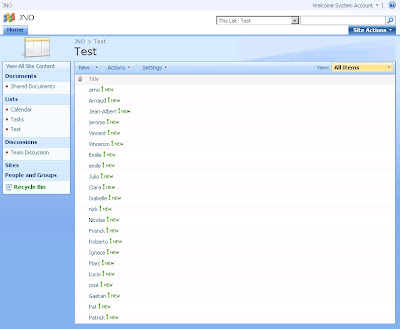
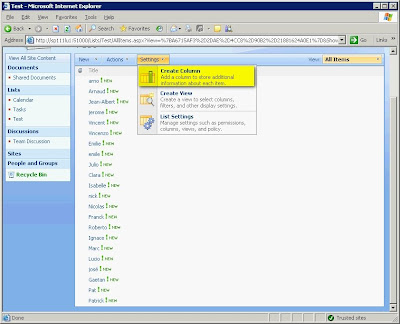
The first thing you have to do is to go in the Settings menu and to select Create Column.
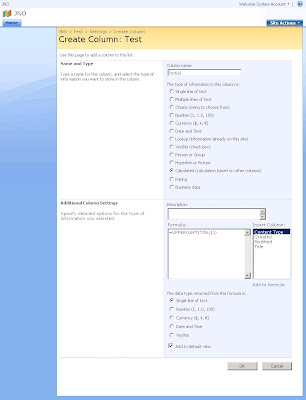
In the Create Column page, enter Initial as Column name and select Calculated as type of information.
As soon as you have selected Calculated, you will have the possibility to enter a formula. Enter =UPPER(LEFT(Title,1)) as Formula and select Single line of text as data type returned by the formula.
To complete this operation, click on OK.
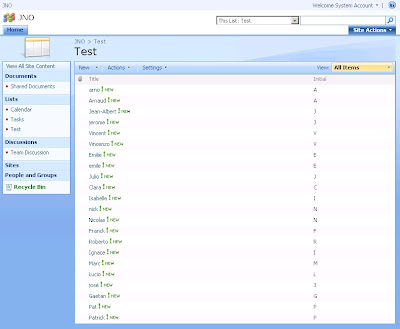
Then you will see on the view, the new column displaying the first letter of the Title field.
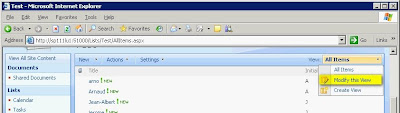
The next operation is to group the items by this new column. So, click on Modify this view in View dropdown list.
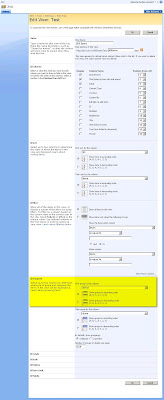
In the Edit View page, go to the Group By section and select Initial as First group by the column. Then click on OK to complete this operation.
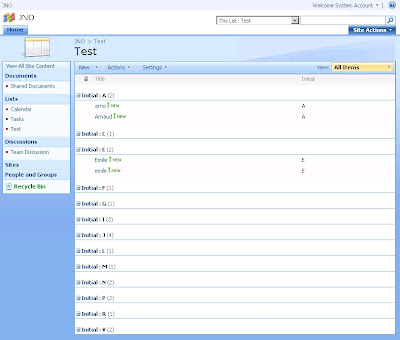
Now, you can see that the view displays the items group the items by the first letter of the Title field.

The first thing you have to do is to go in the Settings menu and to select Create Column.

In the Create Column page, enter Initial as Column name and select Calculated as type of information.
As soon as you have selected Calculated, you will have the possibility to enter a formula. Enter =UPPER(LEFT(Title,1)) as Formula and select Single line of text as data type returned by the formula.
To complete this operation, click on OK.

Then you will see on the view, the new column displaying the first letter of the Title field.

The next operation is to group the items by this new column. So, click on Modify this view in View dropdown list.

In the Edit View page, go to the Group By section and select Initial as First group by the column. Then click on OK to complete this operation.

Now, you can see that the view displays the items group the items by the first letter of the Title field.

May 29, 2009
SharePoint SDK 1.5 is released
The new SharePoint SDK 1.5 has been release on April 2009. This version includes a new version of the Microsoft Business Data Catalog Definition Editor tool.
Downloads:
- SharePoint Server 2007 SDK: here
- Windows SharePoint Services 3.0 SDK: here
MSDN Documentation::
- SharePoint Server 2007 SDK: here
- Windows SharePoint Services 3.0 SDK: here
Downloads:
- SharePoint Server 2007 SDK: here
- Windows SharePoint Services 3.0 SDK: here
MSDN Documentation::
- SharePoint Server 2007 SDK: here
- Windows SharePoint Services 3.0 SDK: here
Mark Wagner explains "How To Hide/Remove the View All Site Content link in SharePoint"
Here is the link to read his article: http://www.crsw.com/mark/Lists/Posts/Post.aspx?ID=36
Here is the link to download the solution package: http://www.crsw.com/mark/Files/VASCSiteAction/VASCSiteAction-Binary.zip
Here is the link to download the solution package: http://www.crsw.com/mark/Files/VASCSiteAction/VASCSiteAction-Binary.zip
May 28, 2009
Content Types Inheritance: How to remove a field inherited from the parent in CAML
As you know, you can inherit from a Content Type in CAML simply in specifying a valid ID. Typically, to inherit from an existing Content Type, you have to respect the following rule: Parent content type ID + "00" + hexadecimal GUID
e.g.: 0x01 (ID of the Item Content Type) + 00 + 21D64BFAA43542c0B10CB673D6445495
The problem when inheriting is that you don't specially need all fields from the parent. To remove a field inherited from the parent, you have to use the RemoveFieldRef tag in specifying the ID of the field.
In the following example, I inherit from the Item Content Type but I add two new fields (Year and Amount) and I remove the Title field:
Have a look on the following MSDN links to understand how Content Types work:
Base Content Type Hierarchy: http://msdn.microsoft.com/en-us/library/ms452896.aspx
Content Type IDs: http://msdn.microsoft.com/en-us/library/aa543822.aspx
Creating Content Types Based on Other Content Types: http://msdn.microsoft.com/en-us/library/ms460224.aspx<
e.g.: 0x01 (ID of the Item Content Type) + 00 + 21D64BFAA43542c0B10CB673D6445495
The problem when inheriting is that you don't specially need all fields from the parent. To remove a field inherited from the parent, you have to use the RemoveFieldRef tag in specifying the ID of the field.
In the following example, I inherit from the Item Content Type but I add two new fields (Year and Amount) and I remove the Title field:
<?xml version="1.0" encoding="utf-8" ?>
<Elements xmlns="http://schemas.microsoft.com/sharepoint/">
<ContentType ID="0x010021D64BFAA43542c0B10CB673D6445495"
Name="Budget"
Description="Create a new budget"
Version="0"
Group="My Inherited Content Types" >
<FieldRefs>
<RemoveFieldRef ID="{fa564e0f-0c70-4ab9-b863-0177e6ddd247}"/>
<FieldRef DisplayName="Year" ID="{6FC684B4-CE06-480f-A8A5-E62277AAFB79}" Name="Year_MICT" />
<FieldRef DisplayName="Amount" ID="{A4D2A891-27D6-4f5d-B5C2-4A9AC4D2000D}" Name="Amount_MICT" />
</FieldRefs>
</ContentType>
</Elements>
Have a look on the following MSDN links to understand how Content Types work:
Base Content Type Hierarchy: http://msdn.microsoft.com/en-us/library/ms452896.aspx
Content Type IDs: http://msdn.microsoft.com/en-us/library/aa543822.aspx
Creating Content Types Based on Other Content Types: http://msdn.microsoft.com/en-us/library/ms460224.aspx<
May 06, 2009
White paper: Working with large lists in Office SharePoint Server 2007
There is an interisting white paper showing how to optimize list performance through limits on the number of items that appear in a list, and by choosing the most appropriate method of retrieving list contents.
Source: here
Download: http://go.microsoft.com/fwlink/?LinkId=95450&clcid=0x409
Source: here
Download: http://go.microsoft.com/fwlink/?LinkId=95450&clcid=0x409
April 29, 2009
Service Pack 2 for Office SharePoint Server 2007 and Windows SharePoint Services 3.0 are available
The Microsoft SharePoint Team has just announced the availability of the Service Pack 2 for Office SharePoint Server 2007 and Windows SharePoint Services 3.0
Source: here
Service Pack 2 for Windows SharePoint Services 3.0, x86 & x64: http://www.microsoft.com/downloads/details.aspx?FamilyId=79BADA82-C13F-44C1-BDC1-D0447337051B&displaylang=en
Service Pack 2 for Office SharePoint Server 2007, x86 & x64: http://www.microsoft.com/downloads/details.aspx?FamilyId=B7816D90-5FC6-4347-89B0-A80DEB27A082&displaylang=en
Source: here
Service Pack 2 for Windows SharePoint Services 3.0, x86 & x64: http://www.microsoft.com/downloads/details.aspx?FamilyId=79BADA82-C13F-44C1-BDC1-D0447337051B&displaylang=en
Service Pack 2 for Office SharePoint Server 2007, x86 & x64: http://www.microsoft.com/downloads/details.aspx?FamilyId=B7816D90-5FC6-4347-89B0-A80DEB27A082&displaylang=en
Subscribe to:
Posts (Atom)



_504b.jpg)

 Posts
Posts


